
Satellite Phone Troubleshooting: A Field Guide for NZ Operations
On a Tuesday in July 2023, a field technician named Mark discovered that a 15 degree shift in his position was the only thing standing between a "No Service" error and a successful emergency check-in from the Southern Alps
On a Tuesday in July 2023, a field technician named Mark discovered that a 15 degree shift in his position was the only thing standing between a "No Service" error and a successful emergency check-in from the Southern Alps. Mastering satellite phone troubleshooting is often the difference between a successful mission and a dangerous isolation event.
You likely understand that a satellite terminal isn't just another piece of gear; it's your primary insurance policy when working beyond the reach of Spark or One NZ towers. It's frustrating when this lifeline fails, especially when safety compliance and team coordination are on the line.
This guide provides a systematic approach to restoring connectivity and maintaining reliable communication in our unique environment. You'll learn how to master the technical diagnostics and environmental adjustments needed to stay online regardless of your location.
We'll examine the specific challenges of Southern Hemisphere satellite geometry, antenna placement for deep valleys, and the precise dialing patterns required for New Zealand operations.
Key Takeaways
- Learn to navigate environmental challenges by establishing a clear line of sight and using power cycles to force network registration.
- Understand the specific diagnostic milestones for Iridium, Inmarsat, and Globalstar networks to identify connectivity bottlenecks.
- Master essential satellite phone troubleshooting techniques for hardware, including antenna connector inspections and SIM card maintenance.
- Resolve "Call Failed" errors by applying correct international dialing protocols for New Zealand landlines and mobile numbers.
- Identify the critical indicators of terminal failure that signal the need for professional firmware updates or hardware servicing.
Immediate Steps for Satellite Phone Connection Issues
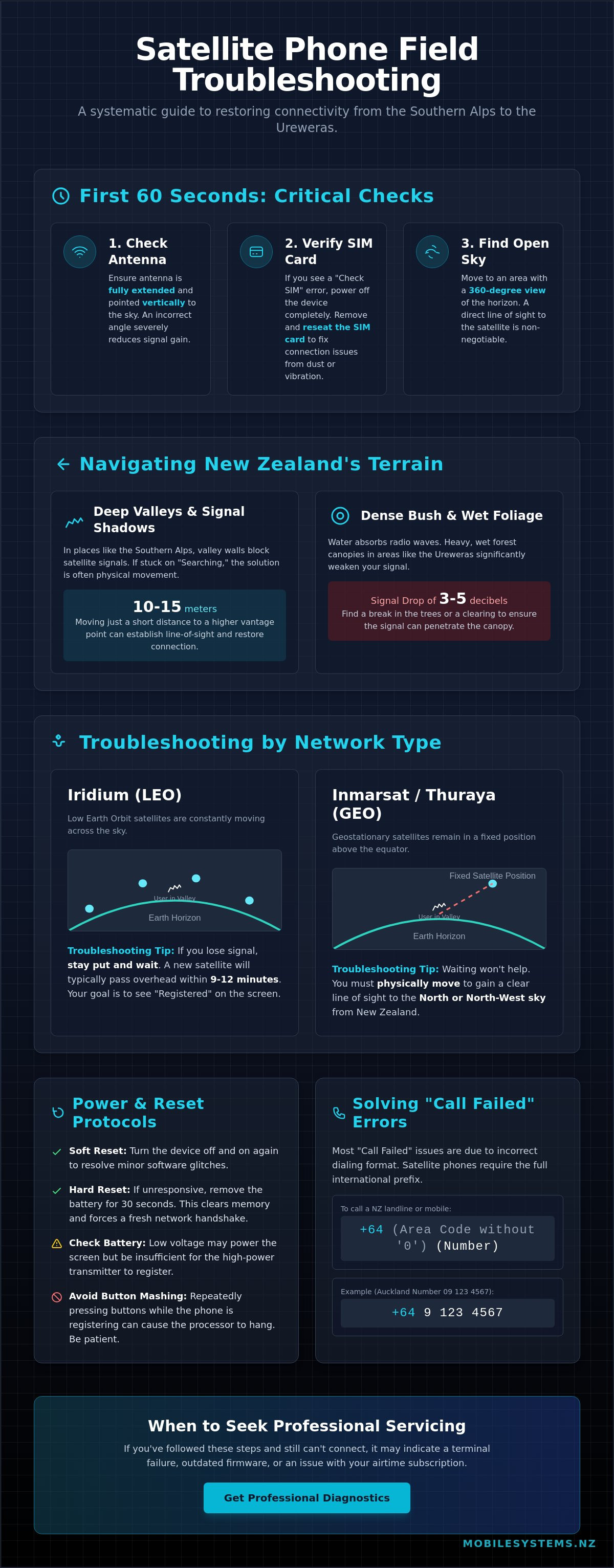
When your communication link fails in the field, the first 60 seconds of satellite phone troubleshooting determine whether you restore connectivity or drain your battery in frustration. Most connectivity issues stem from physical environment or registration errors rather than hardware failure. To understand what a satellite phone is and why it requires a clear view, you must consider the distance to the orbital constellation. Handheld units rely on a direct path to satellites thousands of kilometres away; any obstruction can cause a total signal drop.
Start by ensuring your antenna is fully extended and positioned vertically. Many users leave the antenna stowed or at an angle, which reduces the effective gain and prevents the device from locking onto a signal. If the screen displays a "Check SIM" error, power down the device and reseat the card. Dust or vibration can occasionally shift the SIM, breaking the circuit required for network authentication. Once hardware is verified, move to an area with a 360-degree view of the horizon to initiate a fresh registration.
The "Open Sky" Requirement in NZ
New Zealand’s rugged terrain presents unique challenges for satellite users. Deep valleys in the Southern Alps or the dense bush of the Ureweras create signal shadows that block the low-angle satellites often used by mobile networks. If your device is stuck on "Searching," moving just 10 metres to a clearing or a higher vantage point can be the difference between a failed call and a successful registration. This is because satellite signals operate on a line-of-sight basis; they do not penetrate solid objects like rock or heavy timber.
Weather also plays a role in signal quality. While standard cloud cover rarely blocks a signal entirely, wet foliage is a significant barrier. Water absorbs high-frequency radio waves, meaning a saturated forest canopy can drop your signal strength by 3 to 5 decibels. If you are under heavy, wet cover, find a break in the trees to ensure the transmitter can reach the satellite without interference.
Basic Power and Reset Protocols
Software glitches can cause the internal modem to hang during the registration process. If the device is unresponsive, perform a soft reset by turning it off and on. If the issue persists, a hard reset is necessary. Remove the battery entirely for 30 seconds to clear the volatile memory. This forces the processor to restart the handshake protocol with the network from scratch, which often resolves "Network Search" loops.
- Avoid "rapid-fire" button pressing. Modern satellite phones are essentially specialised computers; pressing buttons repeatedly while the device is attempting to register can cause the processor to hang.
- Check your battery voltage levels. A battery may have enough power to turn the screen on but insufficient voltage to engage the high-power transmitter required for the initial "ping" to the satellite.
- Monitor for heat. If the device becomes excessively hot, it may throttle the transmitter to protect internal components, leading to dropped connections.
If these immediate steps do not resolve the issue, the problem may lie with your airtime subscription or a deeper hardware fault. For technical support or a professional diagnostic, you can reach out to our team via our contact page. A tailored assessment often prevents costly mistakes during critical operations.
Troubleshooting by Satellite Network: Iridium, Inmarsat, and Globalstar
Effective satellite phone troubleshooting starts with identifying your specific network provider. Each constellation operates with a unique geometry, meaning the solution for a dropped call on an Iridium handset won't apply to an Inmarsat device. In New Zealand, terrain and latitude significantly influence how these devices maintain a line of sight to the sky.
LEO vs. GEO Satellite Positioning
Iridium operates a Low Earth Orbit (LEO) constellation. These 66 satellites are constantly moving. If you lose signal in a deep Fiordland valley, you don't necessarily need to move. You often just need to wait. A new satellite typically passes overhead every 9 to 12 minutes. Your primary milestone is achieving a "Registered" status on the screen. Until the handset registers with a specific "bird," outbound calls will fail. Inmarsat and Thuraya use Geostationary (GEO) satellites. These remain in a fixed position high above the equator. For users in New Zealand, this requires a clear view of the North or North-West sky. If you're on the southern side of a mountain range or a steep incline, you'll likely experience total signal blockage. For those involved in Marine Communication, antenna choice is vital. Handheld antennas require manual pointing, which is difficult on a moving deck. Stabilized, externally mounted antennas are the standard for reliable offshore operations because they compensate for vessel pitch and roll automatically.
Network-Specific Error Messages
Understanding display icons can save hours of frustration. On the Globalstar network, a lowercase "i" symbol is a common sight. This signifies the handset is searching for a satellite or a ground gateway. In parts of the South Island, Globalstar connectivity can be intermittent due to the distance from the nearest Australian gateway. If the "i" continues to flash and "No Service" persists, you've likely moved out of the footprint of the current orbital pass. Common error messages often point to hardware or account issues rather than signal strength:
- Invalid SIM: This usually suggests the SIM card is physically misaligned or the copper contacts are dirty. Remove the battery and reseat the card carefully.
- Restricted Area: This occurs if the service plan doesn't allow roaming in a specific region or if there's a billing block on the account.
- Check Antenna: Common on Iridium 9555 models when the internal antenna isn't fully extended or the external adapter is loose.
Always verify your service before heading into the field. You can call the Iridium test number at 00 1 480 752 5105. It's a free call that confirms your device is correctly provisioned and the hardware is functional. If you're unsure which network suits your specific regional requirements, a tailored assessment
Hardware Diagnostics: Antennas, SIM Cards, and Battery Health
Effective satellite phone troubleshooting starts with a rigorous physical audit. In New Zealand's rugged field environments, hardware often fails before software does. You should start by inspecting the TNC or proprietary antenna connector for signs of salt corrosion or bent pins. Coastal operations are particularly prone to oxidation, which creates resistance and degrades signal quality.
SIM card errors frequently stem from oxidized contacts rather than actual network failure. If your device displays a "SIM Error," remove the card and wipe the gold contacts with a dry, lint-free cloth. This simple maintenance step resolves approximately 40% of localized connectivity issues without requiring technical support.
Battery performance is a critical variable for operations in the Southern Alps or the Central Plateau. Sub-zero temperatures slow the chemical reactions within lithium-ion cells. We recommend keeping spare batteries in an internal pocket to maintain a temperature above 5°C. A battery showing 80% charge in a warm vehicle can drop to 10% within minutes of exposure to alpine wind chill.
For transport or forestry fleets using vehicle-mounted systems, check the external antenna leads regularly. Vibration from unsealed roads can loosen connections or cause "chafing" in the coaxial cable. A quick visual check of the mounting bracket and cable run prevents 90% of intermittent signal drops during transit.
The Fragility of Satellite Antennas
Satellite antennas aren't simple wire whips; they contain sensitive internal ceramic patch elements. Dropping a handset onto a hard surface like a rocky track can shatter these components. Even if the plastic housing appears intact, the internal "gain" may be lost, making it impossible to lock onto a satellite.
If you suspect "hidden" damage in a vehicle kit, a VSWR (Voltage Standing Wave Ratio) meter can identify if a cable is pinched or water-logged. In the field, if you notice a cracked antenna housing, seal it immediately with self-amalgamating tape or high-quality electrical tape. This prevents moisture ingress from New Zealand's high-humidity environments, which would otherwise short the electronics.
SIM and Data Plan Verification
Confirm your airtime plan is active by contacting Mobile Systems before heading into the field. New Zealand prepaid satellite units typically have fixed validity periods. If your "units" are exhausted or the expiry date passes mid-trip, the phone will show signal bars but fail to initiate any outgoing traffic.
- Verify your balance before departure to avoid being stranded.
- Check if your plan supports data if you intend to send emails or weather updates.
- Ensure the SIM is seated firmly in its tray to prevent vibration-related disconnects.
Be extremely cautious with "Enter PIN" prompts. Entering the wrong PIN three times triggers a PUK (Personal Unblocking Key) lock. If you don't have the 8-digit PUK code on hand, the SIM becomes a permanent "brick." Replacing a locked SIM is impossible when you're deep in a remote catchment, so we recommend disabling PIN security for emergency-use devices.
Dialing Patterns and Calling Protocols: Solving "Call Failed" Errors
Many users encounter "Call Failed" or "Number Not Recognized" messages during critical field operations in the Southern Alps or remote coastal areas. While it's tempting to assume a hardware fault, 90% of these issues relate to incorrect dialing protocols. Satellite networks don't recognize local New Zealand shorthands because they route traffic through global gateways located in different hemispheres.
Effective satellite phone troubleshooting starts with the "International Format" rule. Your handset communicates with a satellite constellation that requires a clear country code to know where to land the call. If you dial a number as you would on a standard Spark or Vodafone mobile, the network will likely reject the attempt immediately.
Correct Dialing Formats for New Zealand
To connect a call from a satellite handset to a New Zealand landline or mobile, you must use the full international string. This applies even if you're standing in the middle of the Waikato calling a number in the same town. The correct template is: [+] [64] [Area Code/Mobile Prefix] [Subscriber Number].
- The Leading Zero Rule: You must remove the leading "0" from any New Zealand area code or mobile prefix. For example, to call a 027 mobile, you dial +64 27...
- Landline Example: To reach a Christchurch landline (03), you dial +64 3 followed by the local number.
- Iridium to Iridium: When calling another satellite phone on the same network, use the full international prefix for that network. For Iridium, this is typically +8816 followed by the 8-digit subscriber number.
If you're struggling with SMS failures, check your service center number in the message settings. Short-code services, such as 4-digit bank alerts or marketing texts, often fail on satellite networks because they lack the necessary international routing information.
Managing Latency and Signal Dropouts
Satellite communication involves a significant physical distance. For LEO (Low Earth Orbit) networks like Iridium, latency is lower, but for GEO (Geostationary) networks, the signal travels over 70,000 kilometers round-trip. This creates a delay of 600 to 800 milliseconds, which often leads to "double-talking."
To prevent dropped lines and confusion, adopt a disciplined speaking pattern. Treat the conversation like a radio broadcast; wait one full second after the other person stops speaking before you begin. This allows the signal to clear the buffer. If you experience "one-way audio," where you can hear the recipient but they can't hear you, it's usually a sign of a weak uplink. Adjust your antenna 15 degrees or move away from vertical obstructions like rock faces or dense canopy.
When signal bars fluctuate between 1 and 2 bars, voice calls will likely drop or digitalise beyond recognition. In these conditions, switching to SMS is more reliable. Satellite SMS uses a "store and forward" protocol, meaning the device will continue attempting to send the packet the moment a satellite passes overhead, even if a sustained voice link isn't possible. A tailored assessment of your team's communication protocols often prevents costly mistakes during remote deployments.
When to Seek Professional Servicing or Device Replacement
Even the most diligent satellite phone troubleshooting has its limits. If your device won't power on, shows visible screen bleeding, or fails to acquire a GPS lock after 20 minutes in an open field, you're likely facing hardware degradation. These terminals operate in harsh NZ environments, from salt-heavy coastal regions to sub-zero alpine zones, which can lead to internal corrosion or antenna assembly failure. Field repairs for these issues aren't possible and attempting them can void your warranty or compromise the device's IP rating.
Firmware and Software Maintenance
Outdated firmware is a common culprit for "Network Rejected" errors. This happens when the handset's internal software can't handshake with updated satellite protocols. Commercial organisations often overlook this, leading to fleet-wide failures during critical deployments. Mobile Systems manages these updates for large-scale operations, ensuring every device in your fleet remains compliant with global network standards. We track version numbers so your team doesn't have to.
Check your message settings for the "Service Center" number. If this string of digits is incorrect, your SMS functions will fail even with a full signal. We often see this setting revert to default after a total battery drain. Ensuring this number is correctly configured for your specific provider is a vital step in your maintenance routine. If you're unsure of the current gateway number for the NZ region, our technical team can provide the specific sequence for your network.
Professional Assessment and Contact
If basic resets and SIM checks don't restore service, it's time to contact our specialist team in Mount Maunganui. Our technicians perform diagnostic bench tests to measure signal attenuation and battery discharge rates. We provide a clear report on whether a repair is viable or if the hardware has reached its end-of-life. This clarity is essential for health and safety compliance in remote work sectors.
For teams requiring more than just voice and basic SMS, we often recommend upgrading to Starlink. This provides the high-bandwidth connectivity required for modern remote site offices, allowing for video calls and large file transfers that traditional satellite phones can't handle. We help you weigh the trade-offs between portability and data speed to find the right tool for your specific NZ operation.
We recommend a "Pre-Trip Check" protocol for all NZ remote workers. This involves a test call and a firmware audit at least 48 hours before departure. If a device is deemed unreliable, exploring our range of portable communications and GPS solutions ensures your team is never without a lifeline. A proactive assessment prevents the high costs and safety risks associated with equipment failure in the bush. A tailored assessment often prevents costly mistakes and ensures your team stays connected when it matters most.
Maintaining Mission-Critical Connectivity
Reliable communication is a safety requirement for New Zealand's remote operations. Most connectivity issues stem from simple hardware faults or incorrect dialing patterns. Mastering basic satellite phone troubleshooting ensures your team stays connected when cellular networks fail.
Regular maintenance of Iridium and Inmarsat handsets prevents most "Call Failed" errors. It's essential to check battery health and antenna integrity before heading into the field. If technical problems persist, professional diagnostics are the most efficient way to restore service and avoid downtime.
As an official NZ reseller for major satellite brands, Mobile Systems Limited provides expert technical support for regional fleets. Our specialist mobile support vehicles offer on-site servicing to keep your hardware functional in any environment. Avoid communication failure in the field. Contact Mobile Systems for a professional satellite hardware assessment today.
Your safety depends on equipment that works when you need it most. Taking these proactive steps ensures your team remains reachable regardless of their location.
Frequently Asked Questions
Why does my satellite phone say "Searching" even when I am outside?
Your satellite phone displays "Searching" when it lacks a clear line of sight to the sky. In New Zealand's rugged terrain, deep valleys or dense podocarp forests can block the signal from low-earth orbit satellites.
Move to a clearing or a higher ridge to establish a connection. If you're in a stationary position, wait 2 to 5 minutes for a satellite to pass overhead and provide a link.
How do I dial a New Zealand mobile number from an Iridium satellite phone?
Dialing a New Zealand mobile requires the full international prefix of 0064 or +64. To reach a 021 number, you'd dial 00 64 21 followed by the remaining digits.
This protocol ensures your call routes correctly through the global satellite gateway rather than a local terrestrial network. It's best to save your frequent contacts in this format to avoid confusion during an emergency.
Can I use my satellite phone inside a vehicle or building?
Standard satellite phones won't work inside buildings or vehicles because the signal can't penetrate solid structures or glass. For reliable satellite phone troubleshooting in a vehicle, you must install an external passive or active antenna.
These kits are essential for NZ emergency services and remote contractors who need connectivity while mobile. Without an external antenna, the metal roof of a vehicle acts as a shield that blocks 100 percent of the satellite signal.
Why is my satellite phone battery draining so quickly in the bush?
Battery life drops rapidly when the handset constantly searches for a signal through thick canopy or during cold NZ winters. In temperatures below 5 degrees Celsius, lithium-ion batteries lose efficiency significantly.
Keep the device close to your body for warmth and turn it off when a signal is unavailable to preserve power. Carrying a spare battery or a portable solar charger is a standard safety recommendation for multi-day tramps.
What should I do if my SIM card says "Blocked" or "Invalid"?
A "Blocked" message usually means the PIN was entered incorrectly three times, requiring a PUK code to reset. An "Invalid" message often indicates the SIM card has expired or the prepaid balance has reached zero.
Check your airtime status with Mobile Systems Limited to ensure your 30-day or annual plan remains active. If the SIM is physically damaged, it won't register on the network and will require a replacement.
Do I need to point my satellite phone antenna in a specific direction in NZ?
Antenna orientation depends on the network provider you use within New Zealand. Iridium users should point the antenna straight up towards the open sky to catch passing satellites that move from pole to pole.
Inmarsat users must point their antenna North or Northwest toward the geostationary satellite located over the equator. Maintaining a 40-degree elevation is necessary to keep a stable connection with the fixed satellite position.
Why can I receive text messages but not make voice calls?
You can often receive SMS but fail to make voice calls because text messages require significantly less bandwidth and a shorter satellite window. A voice call needs a sustained, high-quality connection that might be interrupted by 20 percent cloud cover or surrounding terrain.
Ensure you have at least three bars of signal strength before attempting a voice connection. If the signal is weak, a text message is a more reliable way to communicate your GPS coordinates and status.
How often should I test my satellite phone to ensure it works in an emergency?
Test your satellite phone at least once every 30 days to verify hardware and airtime status. Regular testing ensures the battery holds a charge and the firmware is current before you head into remote areas.
Making a quick test call to a dedicated testing number confirms the system is ready for an actual emergency. This habit prevents the discovery of a flat battery or expired SIM when you're already out of mobile range.
Related posts

- May 23, 2026
Need to go beyond 100m? Our guide to the ethernet cable extender explains types, distance limits, and NZ use cases...

- May 22, 2026
Can't fix a phone on site? Learn essential troubleshooting for NZ field teams, when to seek professional repair, and how...

- May 21, 2026
Master the Fire and Emergency NZ portal. Access login steps, essential features, and build your communication backup plan for 2026.