
Starlink Speed NZ Uncovered for Commercial and Rural Users
What is the real Starlink speed NZ users can expect? This guide explores performance for rural and commercial use, plan comparisons, and key speed factors.
For Kiwi businesses operating off the beaten track, the big question is simple: what kind of real-world Starlink speed NZ can we actually get? Typically, Starlink delivers download speeds between 100-200 Mbps and upload speeds of 10-20 Mbps, with impressively low latency of around 40-50 milliseconds. This makes it a seriously powerful solution for areas where traditional internet just doesn't cut it.
What Speeds Can You Really Expect from Starlink in NZ?
Let's cut straight to the chase. What kind of performance does Starlink actually deliver across New Zealand? Getting a handle on the real numbers is crucial for any commercial operation, whether you're in agriculture, construction, or maritime logistics.
To get your head around the tech, think of Starlink's Low Earth Orbit (LEO) satellite network as a massive fleet of data couriers constantly flying overhead.
They're close, fast, and deliver your connection almost instantly. This is a world away from the old geostationary satellites, which are like a single, distant depot that causes frustrating delays and high latency.
It’s this LEO architecture that lets Starlink offer speeds that rival, and often blow past, land-based alternatives in rural New Zealand.
Performance Backed by Data
It’s not just marketing hype; independent testing confirms Starlink's solid performance here in New Zealand. According to Ookla's Speedtest Intelligence data from Q2 2023, Starlink clocked a median download speed of 113.78 Mbps.
Even more importantly for business use, latency dropped to just 46.42 milliseconds, which is fantastic for video conferencing, VoIP calls, and other real-time applications.
Bottom line: the service provides a reliable backbone for business-critical tasks that were previously a pipe dream in many parts of the country. For a deeper dive into the available options, check out our guide on Starlink plans in NZ.
Starlink New Zealand Performance at a Glance
We know you're busy, so here’s a quick-glance reference table breaking down what you can realistically expect from a standard Starlink setup in New Zealand.
This should help you figure out if the service has the grunt to meet the demands of your remote sites.
| Performance Metric | Expected Range in New Zealand | Best For |
|---|---|---|
| Download Speed | 100 Mbps – 200+ Mbps | Video streaming, large file transfers, cloud-based software, and general use. |
| Upload Speed | 10 Mbps – 20+ Mbps | Sending large emails, uploading files, video conferencing, and remote monitoring. |
| Latency (Ping) | 25 ms – 60 ms | Real-time applications like VoIP calls, online collaboration, and video meetings. |
As you can see, the numbers are strong enough to support most business operations, providing a stable and fast connection where you need it most.
How Starlink Performs Across Rural and Remote NZ
The official stats are one thing, but what does Starlink performance actually feel like on the ground or out at sea? The real test of any comms solution is how it holds up in New Zealand’s diverse and often challenging environments.
For a remote Waikato farm needing solid connectivity for modern ag-tech, or a Bay of Plenty construction site that has to send large data files back to head office, Starlink speed NZ is a total game-changer.
It’s the difference between fighting to load a single email and running a smooth video conference.
It's the same story on the water. A commercial fishing charter navigating coastal waters needs a rock-solid link for critical weather data and vessel comms. Starlink delivers this with a consistency that older satellite technologies just couldn't dream of.
Understanding Performance Variations
Your Starlink speed isn’t a fixed number; it can fluctuate based on a few key factors. The easiest way to think about it is to picture the satellite network as a busy motorway in the sky. The more 'traffic'—or satellites—passing directly overhead, the stronger and more reliable your signal will be.
This is mainly influenced by two things:
- Satellite Coverage Density: Starlink's constellation is always growing. Areas with a higher concentration of satellites overhead at any given time will naturally get more robust performance. You can get a better feel for this by checking out our satellite coverage map.
- Ground Station Proximity: Your data travels from your dish up to a satellite, which then beams it down to a physical ground station connected to the global internet. The closer you are to one of these stations, the lower your latency, making the connection feel snappier.
This graphic gives a great snapshot of the typical performance metrics you can expect across New Zealand.
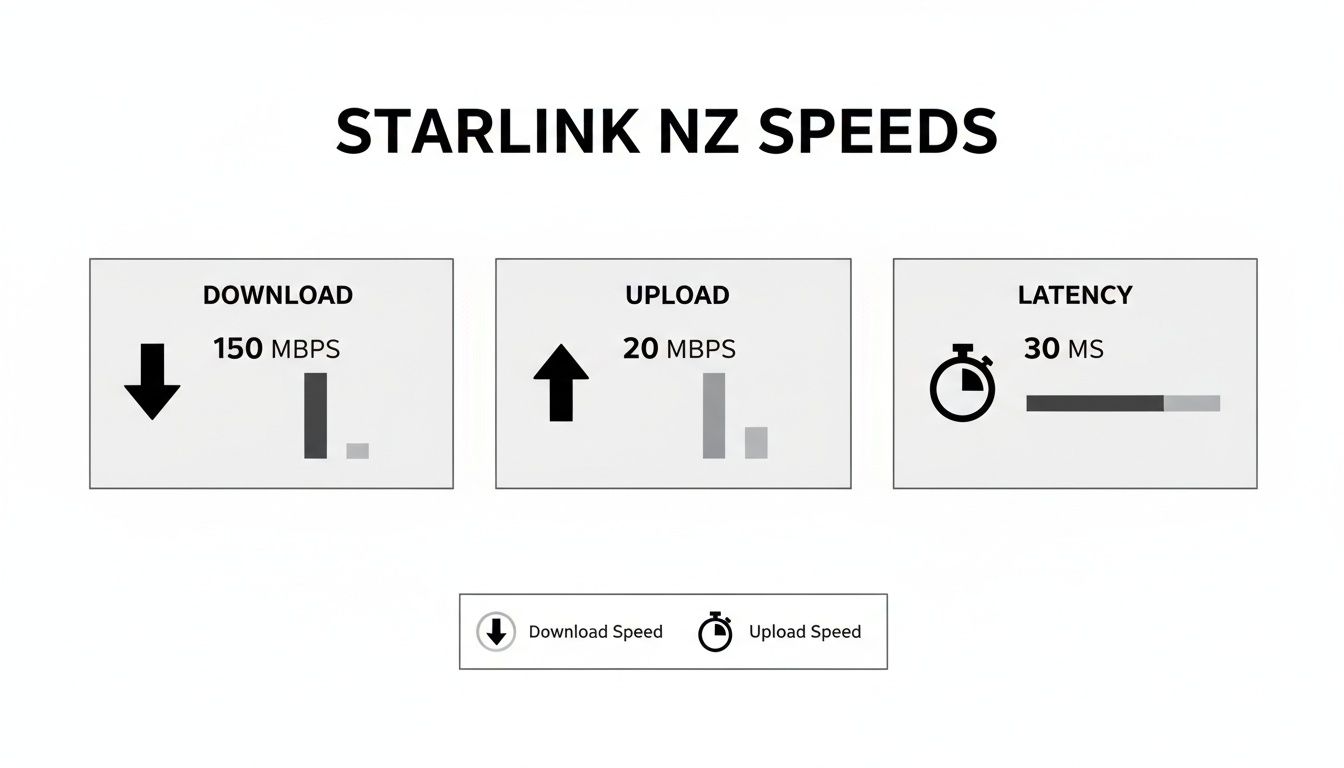
As you can see, Starlink delivers serious download speeds for data-heavy work, strong upload speeds for business communications, and low latency that’s perfect for real-time applications like video calls.
Real-World Scenarios in NZ
So, what do these numbers mean for commercial operators in the real world?
A logistics company with a depot in a remote part of the North Island can use Starlink for uninterrupted fleet tracking and management. It ensures their vehicle GPS systems, often from trusted brands like Viewtech or Dahua, are always online, which boosts both efficiency and safety.
Meanwhile, a tourism operator deep in the Mackenzie Basin can offer high-speed Wi-Fi to guests—a massive value-add in an area traditionally known for terrible connectivity.
For many rural New Zealand businesses, Starlink isn't just an upgrade. It's the first time they've ever had access to a truly functional, high-speed internet connection, finally allowing them to use modern operational tools that were previously out of reach.
The impact has been huge. As of August 2024, satellite broadband, led by Starlink, now accounts for 14% of all rural connections in New Zealand.
Starlink delivers average download speeds of 184 Mbps in rural areas, making it more than four times faster than the next best option—rural 4G, which clocks in at just 45 Mbps. This massive performance gap is exactly why it’s being adopted so quickly, even with the initial hardware cost.
The Key Factors That Influence Your Starlink Speed

Getting the best possible Starlink speed NZ performance isn’t just about the satellites orbiting overhead; it's hugely dependent on your setup right here on the ground.
You can think of your Starlink dish a bit like a solar panel for the internet, to work properly, it needs a wide-open, clear view of the sky. A handful of key variables can make the difference between a lightning-fast connection and a frustratingly slow one.
For any business relying on Starlink for critical operations, whether it’s a remote construction site or a vessel out on the Hauraki Gulf, getting these details right from the start is non-negotiable. It’s how you ensure you get the reliable, high-speed connection you’re paying for.
The Critical Importance of a Clear View
The single biggest factor for your Starlink connection is its "cone of visibility." Your dish needs an incredibly wide view of the sky so it can seamlessly track and talk to the thousands of satellites zipping by overhead.
Even small obstructions can create surprisingly big problems. Anything that gets in the way of this cone can lead to micro-dropouts and sluggish speeds.
Common obstructions to watch out for include:
- Tall Trees: Thick leaves and branches are a major signal blocker.
- Nearby Buildings: Rooflines, chimneys, or even your neighbour’s house can cut into the dish's line of sight.
- Hills and Terrain: For sites tucked into valleys or hilly country, smart placement is crucial to see over the landscape.
- Onboard Obstructions: On a boat or vehicle, things like masts, booms, or other equipment need to be carefully considered.
Why Professional Antenna Placement Matters
While setting the dish on the ground might seem like the easiest option, it’s almost always the least effective for a business. Popping the dish up on a roof or a dedicated mast is the way to go, as it lifts the antenna above all those potential ground-level obstructions.
For a work vehicle, vessel, or remote office, a professional installation is the only way to guarantee top-tier performance long-term.
A professional installation from communication specialists ensures the dish is positioned for the absolute best line of sight. This isn't just about dodging a few trees; it's a strategic assessment to guarantee maximum uptime and reliability for your business operations.
Specialists can also supply rugged mounting solutions from brands like Ram Mounts, making sure the hardware stays put on a moving vehicle or vessel, even in harsh New Zealand conditions. That expertise is vital for keeping a stable connection when it matters most.
How Network Congestion Affects Your Speed
Just like any internet service, Starlink is a shared resource. You might notice a bit of a dip in performance during peak hours—usually evenings when everyone jumps online to stream movies and play games. This is simply network congestion.
Think of the satellite network as a motorway. During rush hour, the traffic slows down for everyone. While Starlink's network is impressively robust, these periods of high demand can temporarily put a cap on the top speeds for users on standard plans.
Your Service Plan and Data Priority
Not all data travelling on the Starlink network gets the same treatment. The service plan you’re on directly affects your place in the queue, especially during those busy, congested hours.
- Standard Plans: These are perfectly fine for general use, but your data is considered "standard" priority. When the network gets busy, your speeds might be throttled to make sure priority users get the bandwidth they need.
- Priority Plans: Built for business and high-demand users, these plans essentially give your data a pass to the express lane. Even when the network is humming, your connection stays fast and stable—which is critical for things like video calls, VoIP, or shifting large files.
For any commercial operation, choosing the right plan is a crucial business decision. The slightly higher cost of a Priority plan usually pays for itself many times over through rock-solid reliability and consistent performance, protecting your productivity when you can't afford a slowdown.
Choosing the Right Starlink Plan for Your Business Needs
Picking the right Starlink plan is a big decision for any commercial operation. Get it right, and you’ve got the reliable connection you need to run your business without a hitch. Get it wrong, and you could be dealing with frustrating slowdowns right when you need to be productive.
Here in New Zealand, the options are designed to handle different levels of demand. We’re talking everything from general daily use to absolutely mission-critical applications where a dropped connection simply isn't an option.
The trick is to look past the marketing and match a plan to what your business actually does. Whether you need stable video calls with a remote construction crew, real-time data from agricultural sensors, or failsafe communication on a vessel out at sea, there’s a Starlink plan built for the job.
Differentiating Standard and Priority Plans
The main difference between Starlink’s plans boils down to one simple thing: data priority.
Picture the internet as a multi-lane motorway. When it's quiet, traffic flows freely everywhere. But during peak hour, things can get congested.
- Standard Plans: Your data travels in the main lanes with everyone else. Most of the time, it’s fast and efficient. But when the network gets busy, your speed might dip slightly to let higher-priority traffic through first.
- Priority Plans: This gives your data access to a dedicated 'fast lane'. Even when the network is at its busiest, your connection stays stable and quick, ensuring your business-critical tools don't falter.
For a transport operator relying on constant fleet tracking or a forestry crew sending vital safety updates, that fast lane isn't a luxury—it's an operational necessity.
Cost and Performance Expectations
A smart investment always comes down to balancing cost against performance. For fixed locations, Starlink offers New Zealand customers two main service tiers. The standard residential plan sits at NZ$159 per month, while a deprioritised plan is available for just NZ$79 per month.
Interestingly, both plans offer the same top speeds of up to 243 Mbps download and 41 Mbps upload with unlimited data.
The key difference is that the cheaper plan gets lower priority during network congestion, though its performance is still incredibly competitive. You can dig into the latest pricing and details by checking out some independent analysis on Starlink internet speeds.
For commercial and mobile use, Priority plans cost more but deliver guaranteed performance levels. This is crucial for any business where connectivity directly impacts revenue, safety, and efficiency.
Matching the Plan to Your Business
So, which one is for you? It all comes down to your day-to-day operational demands. A small remote office handling emails and admin might find a Standard plan is more than enough.
But a construction firm managing large blueprint files, a maritime company needing constant weather updates from trusted brands like McMurdo, or a logistics business running cloud-based management software will see huge value in a Priority plan.
To make it even clearer, here’s a straightforward comparison of the business plans available in New Zealand.
Comparison of Starlink Plans for NZ Businesses
This table breaks down the core differences between the Standard and Priority plans, helping you align the right option with your operational needs and budget.
| Feature | Standard Plan | Priority Plan |
|---|---|---|
| Best For | General business use, small remote teams, non-critical data tasks. | Business-critical applications, large data transfers, VoIP, video conferencing. |
| Performance | Excellent speeds, but may be deprioritised during network congestion. | Consistently high speeds, even during peak network usage hours. |
| Use Case | A farm office checking emails and market prices. | A mobile health clinic conducting remote patient video consultations. |
| Cost | Lower monthly fee. | Higher monthly fee for guaranteed performance and reliability. |
Ultimately, the goal is to make an informed choice that truly supports your business. Investing in the right Starlink solution means you get unwavering connectivity, ensuring maximum return and peace of mind.
How to Optimise and Troubleshoot Your Starlink Connection
Even the best technology needs a little tweaking to get it running just right. Hitting the top Starlink speed NZ offers isn’t just about the plan you’re on; it’s about making sure your gear is set up correctly and knowing what to do when things get a bit sluggish.
This is the hands-on part. We'll walk you through the tools you have at your fingertips to diagnose issues and cover some simple, effective tricks for when your connection isn't cooperating. Getting these basics right can be the difference between an average signal and a truly solid one.
Of course, for demanding commercial and maritime setups, nothing beats having an expert on your side. A specialist partner ensures your system is robust, reliable, and properly integrated into your operation from day one.
Using the Starlink App for Peak Performance
Your best friend for managing your connection is the Starlink app on your phone. It’s much more than a setup wizard—it’s a powerful diagnostic tool that gives you a live look at your system’s health.
The most important feature by a long shot is the "Check for Obstructions" tool. It uses your phone's camera to scan the sky, showing you exactly where the dish needs a clear line of sight.
Running this scan before you permanently mount anything is the SINGLE MOST IMPORTANT STEP for a stable connection.
The app also gives you a heap of other useful stats:
- Real-time Speed Test: Check your current download and upload speeds straight from the source.
- Outages Log: This shows a history of any micro-dropouts, which are almost always caused by something briefly blocking the signal. If you see a long list here, it’s a dead giveaway your dish needs a better view.
- Latency Monitoring: Keep an eye on your ping to make sure it’s low enough for things like video calls or online gaming.
Simple Troubleshooting Steps for Common Issues
If your speeds suddenly drop or the connection feels patchy, don't panic. Most problems can be sorted with a few quick checks before you need to call for backup.
Always start with the simplest fix: a full system reboot. Unplug the Starlink router from the wall for at least 30 seconds, then plug it back in. This classic "power cycle" forces the system to find a new connection and often clears up temporary glitches.
Next, have a look at your physical connections. Make sure the cable running from the dish to the router is clicked in securely at both ends and isn't frayed or damaged. A loose cable is a surprisingly common culprit for poor performance.
For our commercial clients, that physical cable integrity is critical, especially on a work vehicle or vessel where constant vibration and movement are part of the job. A professional installation means cables are properly secured and shielded from the elements.
The Value of Professional Support for Commercial Setups
While these DIY steps work well for common hiccups, commercial and maritime operations have far more complex needs. This is where partnering with a specialist like Mobile Systems becomes essential for keeping your team online.
Professional support is about much more than just the initial setup. We can help with:
- Ruggedised Mounting Solutions: We use top-quality hardware from brands like Ram Mounts to make sure your dish is mounted securely enough to handle the roughest conditions on land or sea.
- Complex Power Management: We can design and install stable power systems for vehicles and vessels, ensuring your Starlink runs reliably without draining your essential batteries.
- Network Integration: We’ll get Starlink talking to your existing on-site networks, often using the Starlink Ethernet Adapter. You can read more about how we do this in our guide on the Starlink Ethernet Adapter.
By leaning on our expertise, you transform your Starlink system from a simple internet connection into a robust, fully integrated part of your business's communications toolkit, ensuring it works when it matters most.
Comparing Starlink Speed to Other NZ Internet Options
To really get a feel for the kind of performance Starlink speed NZ operators can tap into, it helps to see how it stacks up against the usual suspects. For years, businesses in rural and remote spots have had to put up with connections that were, let's be honest, pretty average at best.
Starlink isn't just a small step up. For many, it's a giant leap forward, delivering a level of performance that was just a pipe dream a few years ago.
Let's put it head-to-head with rural 4G/5G, VDSL, and fibre to show why it's such a powerful choice for commercial teams let down by older tech.
Starlink vs Rural 4G and 5G Cellular
Mobile internet has long been the go-to for connecting remote sites, but its performance is all over the place. If you happen to be right next to a tower with a perfect line of sight, you might get decent speeds. But for most crews out in the wop-wops, the reality is a weak, patchy signal that drops out at the worst possible moment.
Starlink sidesteps this problem entirely. Because its signal comes from the sky, it couldn’t care less about hills, dense bush, or how far you are from the nearest cell tower.
- Speed: Sure, 5G can technically be faster in the middle of Auckland or Wellington, but its rural footprint is tiny. Starlink consistently delivers 100-200+ Mbps in areas where 4G is struggling to give you a fraction of that.
- Reliability: Mobile signals are notorious for getting congested and being affected by bad weather. Starlink offers a far more stable connection, which is absolutely critical for business operations.
For a construction crew on a remote project, that means they can actually use data-heavy project management tools and video conferencing—things that would be impossible over a dodgy 4G link. It provides the kind of solid connection you need for reliable comms gear from brands like Motorola or Hytera.
Starlink vs VDSL and Fibre
Fibre is the undisputed champion of internet speed, but rolling it out across rural New Zealand is a slow and eye-wateringly expensive job. Many commercial operations will be waiting years, if not decades, for a fibre connection.
VDSL is more common, using old copper phone lines, but its speed drops off a cliff the further you are from the local exchange.
Starlink neatly bridges this massive gap. It offers fibre-like download speeds in places where digging trenches for cable just isn't going to happen.
For businesses operating beyond the reach of the fibre network, Starlink isn't just another option; it is often the only viable path to getting modern, high-speed internet. It puts remote operations on a level playing field with their city-based competitors.
Its performance blows what most rural users get from an ancient copper line right out of the water, making it the clear winner for any data-intensive business.
The Low Latency Advantage Over Traditional Satellite
Maybe the biggest trump card Starlink holds over old-school satellite internet is its incredibly low latency. Traditional geostationary satellites orbit more than 35,000 km above the Earth. That massive distance creates a significant signal delay (or high latency), making real-time applications like video calls or VoIP painfully slow and almost unusable.
Starlink's satellites are in Low Earth Orbit (LEO), zipping around at just 550 km up. This drastically slashes latency down to 25-60 ms—that's on par with ground-based connections like fibre.
This low latency is a complete game-changer. It enables smooth video meetings, real-time data monitoring from the field, and snappy cloud software without the frustrating lag we associate with old satellite systems. The connection just feels responsive, exactly like you'd expect from a fibre link.
Common Questions About Starlink Speed in NZ
Even with the technical details covered, you probably still have a few practical questions. Let's tackle some of the common queries we get from commercial operators and field teams to give you the straightforward answers you need.
How Does Bad Weather Affect Starlink Speed?
We get this one a lot. Heavy rain, hail, or extremely dense cloud cover can sometimes weaken the satellite signal, a phenomenon known as 'rain fade'. In a serious downpour, you might see a temporary dip in your Starlink speed NZ performance or even a brief outage.
That said, the Starlink dish has a clever built-in heater to melt snow and ice, and the network is designed to be highly resilient. For the vast majority of New Zealand weather, the impact is minimal and passes quickly.
A professional installation is also key here, as correct placement and secure mounting can make a real difference in minimising weather-related disruptions.
Can I Use Starlink on My Work Vehicle or Boat?
Absolutely. This is where Starlink really shines for mobile operations. They offer specific Mobile Priority plans and purpose-built hardware designed for in-motion use on everything from utes and trucks to marine vessels. This gives you a continuous, high-speed connection pretty much anywhere you can travel in New Zealand.
For any kind of commercial mobile setup, we can't stress this enough: get it done by a specialist. An expert provider will supply professional, rugged mounting solutions from trusted brands like Ram Mounts and handle the complex power integration. This ensures the system can withstand the constant vibration and harsh conditions out in the field or on the water.
Is Starlink Faster Than 5G in Rural NZ?
This really comes down to "where are you standing?". If your site happens to have a strong, clear line of sight to a 5G tower, then yes, 5G can deliver some seriously impressive peak speeds.
But let's be realistic—genuine 5G coverage is incredibly scarce across most of rural and remote New Zealand. In these areas, Starlink isn't just a bit faster; it's a completely different league. It's significantly faster and more reliable than the patchy 4G or older cellular services you're likely to find, making it the clear winner for consistent, high-performance connectivity off the beaten track.
For expert advice on the right communication solutions for your business, from Starlink to Motorola and Hytera radios, trust the specialists at Mobile Systems Limited. We provide professional hardware, installation, and support for commercial operations across New Zealand.
Explore our communication solutions at https://mobilesystems.nz.
Related posts

- July 08, 2026
Communication Systems That Keep Small Mistakes SMALL Small mistakes will always happen. Someone mishears an instruction. A radio battery runs...

- July 03, 2026
A radio bolted in badly is worse than no radio at all. Here's how fleet communication system installation is actually...

- July 01, 2026
These days, practically everyone walks around with a smartphone in their pocket. They're built to do just about everything. But...