
Programming Two-Way Radios in NZ: A Professional Fleet Guide
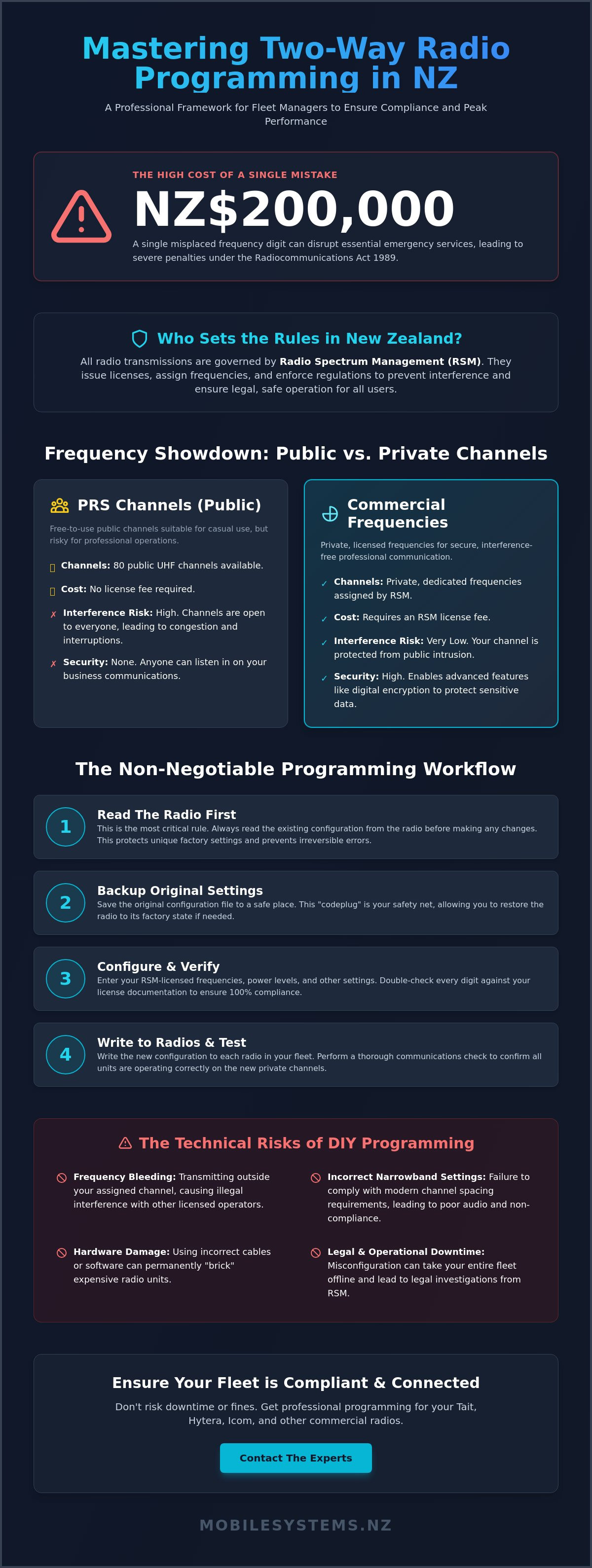
A single misplaced frequency digit when programming two way radios nz can lead to a NZ$200,000 fine under the Radiocommunications Act 1989 if it disrupts essential emergency services. It's a high-stakes task that often leaves fleet managers feeling overwhelmed by technical jargon and proprietary software hurdles.
A single misplaced frequency digit when programming two way radios nz can lead to a NZ$200,000 fine under the Radiocommunications Act 1989 if it disrupts essential emergency services. It's a high-stakes task that often leaves fleet managers feeling overwhelmed by technical jargon and proprietary software hurdles.
You likely recognize that keeping your team connected shouldn't involve the constant fear of regulatory non-compliance or equipment interference. Managing a commercial fleet requires precision, yet the path to a fully synchronized radio network is rarely straightforward for those without specialized tools or licensing knowledge.
This guide provides a professional framework to help you master the programming workflow while meeting all Radio Spectrum Management (RSM) standards. You'll learn the exact steps to ensure fleet-wide compatibility, from selecting the correct cables to managing frequency allocations without the typical guesswork.
We'll examine the technical requirements for commercial-grade hardware and explain why a structured approach to frequency management prevents costly downtime and legal complications for your New Zealand business.
Key Takeaways
- Understand how Radio Spectrum Management (RSM) governs frequencies in New Zealand to ensure your fleet remains legally compliant.
- Discover why professional-grade cables and software are essential for the programming two way radios nz businesses rely on to avoid hardware communication errors.
- Learn the "Read First" rule to protect your equipment and why backing up factory settings is a non-negotiable step before making configuration changes.
- Identify the technical risks of DIY programming, such as frequency bleeding and incorrect narrowband settings, which can lead to hardware damage.
- Explore how expert technical support ensures your Tait, Hytera, or Icom units are optimized for peak performance and nationwide reliability.
The Essentials of Two-Way Radio Programming in New Zealand
Effective communication for New Zealand businesses starts with proper equipment configuration. In its simplest form, radio programming is the technical process of aligning your hardware with specific frequency licenses authorized for use in New Zealand. This ensures your two-way radio fleet communicates on the correct channels without disrupting other users. Professional programming two way radios nz requires a deep understanding of local regulations and hardware capabilities.
Radio Spectrum Management (RSM) is the government body that governs all radio transmissions across the country. Radios purchased "out of the box" often come with factory default settings that don't match NZ legal requirements. These default frequencies might overlap with restricted bands used by emergency services or existing commercial operators. Relying on factory settings isn't just a technical risk; it's a legal one that can lead to significant operational downtime.
Understanding NZ Frequency Licensing
The RSM has the authority to issue infringement notices and fines reaching thousands of NZD for unauthorized transmissions. Every business using commercial-grade equipment must secure a license for their specific geographic location. This license dictates the exact frequency and power levels your fleet can use. Professional programming two way radios nz ensures your equipment stays strictly within its assigned legal bandwidth, preventing overlap with neighboring businesses. A tailored assessment often prevents these costly compliance mistakes and ensures your radio hardware performs optimally within its legal "lane."
PRS vs. Commercial Frequencies
New Zealand provides 80 free-to-use Personal Radio Service (PRS) channels on the UHF band. While these are convenient for casual use or small teams, they aren't suitable for high-density industrial sites or long-range transport. PRS channels are open to the public, meaning anyone can listen to or interrupt your conversations. Professional programming allows businesses to move away from these crowded public airwaves and onto private, licensed frequencies. This transition provides interference-free communication and allows for advanced features like digital encryption, which protects your sensitive business data. If you're unsure which path fits your needs, reaching out for a consultation with our team can clarify your requirements.
- PRS Channels: 80 public channels, no license fee, high risk of interference.
- Commercial Frequencies: Private, licensed through RSM, requires professional programming.
- Compliance: Programming limits power output to meet NZ health and safety standards.
Relying on standard settings often limits the range and clarity of your devices. By investing in professional programming, you ensure your fleet is a tool for efficiency rather than a liability. It's the difference between a radio that simply turns on and one that provides a reliable lifeline for your staff in the field.
What You Need for Successful Radio Configuration
Configuring a professional fleet requires more than just a standard laptop. Success depends on what technicians call the "Holy Trinity" of radio setup. This consists of the radio unit itself, a manufacturer-specific programming cable, and the correct Customer Programming Software (CPS). Missing any one of these components, or using the wrong version, makes programming two way radios nz impossible.
Hardware quality is the most common point of failure. While generic cables are available on sites like eBay, they frequently fail to communicate with professional Tait or Hytera units. These cheap alternatives often lack the authentic Prolific or FTDI chipsets required for stable data transfer. In professional environments, using non-genuine cables can lead to "bricked" radios, where the firmware becomes corrupted during a write cycle, requiring a factory reset.
Your PC must also be prepared for the task. Most modern programming interfaces use USB-to-Serial technology. You need to ensure your operating system has the correct drivers installed to recognize these interfaces. Without the precise driver version, the software won't detect the radio, even if the cable is physically plugged in. It's a technical hurdle that often stalls DIY attempts.
Customer Programming Software (CPS)
CPS is proprietary and brand-specific. You cannot use Tait Configure to program a Hytera radio, and vice versa. It's also vital to match the software version to the radio's internal firmware. If your radio was manufactured in 2023, it likely requires the most recent CPS version to access all features. Sourcing this software legally through an authorized dealer is the only way to ensure compliance with Radio Spectrum Management standards.
Using outdated or "cracked" software is a significant risk. It can bypass safety limits or lead to frequency drift, which might result in your business interfering with emergency service channels. Authorized software ensures that your programming two way radios nz project stays within the legal boundaries of your specific NZ frequency license.
The Importance of a Master Codeplug
A codeplug is the master configuration file for your fleet. Think of it as a digital blueprint. It contains every setting for the radio, including channel names, power levels, and UI preferences. For a fleet of 20 or 50 radios, you don't program each one from scratch. You create one master codeplug and clone it to every device to ensure total uniformity.
A comprehensive master codeplug includes several critical elements:
- Exact transmit and receive frequencies for every channel.
- Scan groups that allow users to monitor multiple departments.
- Emergency button logic and "Lone Worker" safety timers.
- Digital encryption keys to prevent unauthorized eavesdropping.
Maintaining a secure backup of your master codeplug is a vital business continuity step. If a radio is lost or damaged on a job site, a technician can restore your exact settings to a replacement unit in minutes. A tailored assessment of your current codeplug structure often prevents communication bottlenecks and ensures your fleet operates at peak efficiency.
Step-by-Step Process for Programming Your Fleet
Successful fleet deployment starts with meticulous preparation. Before connecting any hardware, ensure every radio battery is charged to 100% capacity. A power failure during the data transfer process can corrupt the firmware, potentially bricking the device. Clean the data ports with a dry, lint-free cloth to ensure a stable connection between the radio and the programming cable.
The "Read First" rule is the most critical habit for anyone programming two way radios nz. Always download and save the existing factory configuration before making any changes. This creates a backup file that allows you to restore the radio to its original state if the new settings cause unexpected issues. Label these files clearly with the date and device serial number.
Input your specific RX (Receive) and TX (Transmit) frequencies exactly as they appear on your Radio Spectrum Management (RSM) license. Incorrect entries can lead to illegal interference or communication failure. Adding CTCSS or DCS tones helps filter out unwanted traffic from other users on shared frequencies. This is a common requirement when managing Personal Radio Services and commercial frequencies in busy New Zealand urban areas.
Configure device features to match your operational needs. Set power levels to "Low" for indoor warehouse use to save battery, or "High" for expansive outdoor sites. Adjust the Time-Out Timer (TOT) to 60 seconds to prevent a stuck PTT button from blocking the entire channel. Finally, map the side buttons to essential functions like "Nuisance Delete" or "Emergency" for quick access in the field.
The final step is the "Write" command, which uploads your configuration to the handset. Once complete, perform a field test at the furthest point of your operating area. Check that audio is crisp and that all programmed buttons perform their assigned tasks. A tailored assessment of your fleet settings often prevents costly mistakes during a busy shift.
Configuring Channels and Zones
Organize your fleet by grouping channels into "Zones." This allows users to switch between different departments, such as Logistics, Safety, or Management, without scrolling through dozens of irrelevant channels. Use clear, alphanumeric names like "SITE-OPS" or "SEC-GATE" so users can identify their location instantly on the display. Setting up Scan Lists is also vital for supervisors who need to monitor multiple departments simultaneously.
Advanced Digital Settings (DMR & P25)
Digital programming two way radios nz requires assigning a unique Radio ID to every handset. This ID enables individual calling and allows dispatchers to track specific units. For DMR systems, you must configure Color Codes and Time Slots correctly to maximize channel efficiency. If your business handles sensitive information, implement AES-256 encryption keys to ensure your private conversations stay secure from unauthorized listeners.
If you need assistance with complex fleet configurations, contact our technical team for expert guidance.
Professional vs. DIY Programming: Evaluating the Risks
While open-source software and inexpensive cables make DIY attempts tempting, programming two way radios nz requires precision to meet Radio Spectrum Management (RSM) standards. Mistakes often lead to "frequency bleeding." This occurs when your transmissions interfere with neighboring channels, which can result in enforcement action from the Ministry of Business, Innovation and Employment (MBIE). Bricking a high-value digital radio is a significant risk when using unverified firmware or incorrect COM port settings. If the bootloader is corrupted during a write cycle, the device often requires a factory-level reset. These repairs often cost more than the initial professional programming fee. Professional alignment ensures that the hardware operates within its designed parameters, which maximizes both range and battery life. One of the most frequent errors involves bandwidth settings. In New Zealand, most land mobile radio (LMR) licenses require narrowband (12.5kHz) spacing. DIY users frequently leave radios on the default wideband (25kHz) setting. This causes audio distortion and overlaps into adjacent channels, violating the terms of your spectrum license.
Common Programming Pitfalls
- Incorrect duplex offsets: Repeaters require a specific "split" between receive and transmit frequencies. A small error in this offset means your fleet won't be able to trigger the repeater, rendering the entire network useless.
- Overlooking the Time Out Timer (TOT): Professional setups use a 60-second TOT. Without this, a jammed PTT button or a heavy object leaning on a handheld can block an entire channel for hours.
- Incorrect power levels: Using 25W high power on a site where 1W or 5W is legally mandated causes unnecessary interference. It also drains battery life up to 40% faster than necessary.
The Value of Professional Frequency Management
Radio technology and regulations evolve. Experts at Mobile Systems ensure your fleet stays compliant with New Zealand's specific frequency changes and digital transitions. We don't just upload a configuration file; we perform bench testing to verify sensitivity and signal deviation. Field testing is a critical part of the process. This verifies that the programmed power levels actually cover your specific topography, whether you're operating in a multi-story Auckland basement or a remote forestry block. You can learn about our custom system design to see how we integrate hardware with specific frequency requirements.
If you're managing a fleet of more than five units, a professional audit is the most reliable way to ensure long-term performance. Contact our technical team for a professional fleet assessment.
Optimising Your Communication System with Mobile Systems
Based in Mount Maunganui, our technical team provides nationwide support for businesses requiring precision in their radio configurations. We specialise in programming two way radios nz for diverse sectors, including forestry, civil construction, and logistics. Our engineers possess deep technical knowledge of NZ-made Tait communications equipment alongside global standards from Hytera and Icom.
A tailored fleet assessment is the foundation of a reliable communication system. We identify potential frequency overlaps and configuration errors that lead to signal interference or total blackouts. By aligning your setup with Radio Spectrum Management (RSM) standards, we ensure your business remains OSH compliant. This prevents the common mistake of using unassigned frequencies or incorrect power levels, which can result in significant legal penalties and operational disruptions.
Reliability doesn't end at the initial deployment. We provide ongoing firmware updates to patch security vulnerabilities and introduce new digital features as they become available. Our remote programming services allow us to adjust your fleet settings without requiring every vehicle to return to a central depot. This capability reduces downtime by approximately 80% compared to traditional manual updates.
Why Choose Mobile Systems for Fleet Programming?
We bring over 25 years of experience operating in New Zealand's rugged commercial environments. Our team manages the entire technical lifecycle, from the initial frequency license application to the final device rollout. We focus on clarity and safety in every configuration we build, ensuring that critical features like emergency buttons and lone worker alerts function correctly in high-risk zones.
- Expertise in both analogue and digital (DMR/P25) migrations.
- Comprehensive management of RSM licensing requirements.
- Customised channel mapping for multi-site operations.
- Technical support for New Zealand's unique terrain challenges.
Next Steps for Your Radio Fleet
If you're managing a growing fleet or upgrading legacy hardware, a professional review is essential to maintain performance. You can explore our two-way radio collection to see the latest digital models currently available for NZ industries. Choosing the right hardware is only half the battle; the configuration determines how well that hardware serves your team.
A tailored assessment often prevents costly mistakes during the initial setup phase. To discuss your specific frequency requirements or to request a quote for fleet-wide programming, contact us for an expert assessment. Our team will help you build a communication network that is resilient, compliant, and ready for the demands of the New Zealand landscape.
Future-Proofing Your Fleet Communication
Efficient fleet management relies on technical precision. Correct programming two way radios nz ensures your hardware remains compliant with local Radio Spectrum Management standards while preventing signal interference. It's the difference between a reliable link and a system failure during critical operations.
As authorized Tait and Hytera partners, Mobile Systems provides NZ-based technical support for complex commercial and industrial setups. Our team ensures every unit in your fleet is optimized for its specific environment. Professional configuration extends the life of your equipment and guarantees your team stays connected when it matters most.
Don't leave your communication infrastructure to chance. A precise setup today prevents operational headaches tomorrow. Request a tailored fleet assessment from our expert team to ensure your system meets the highest industry standards.
We look forward to helping you build a more resilient network for your business.
Frequently Asked Questions
Do I need a license to use two-way radios in New Zealand?
Yes, most business-grade radios require a specific license issued by Radio Spectrum Management (RSM). While low-power Citizen Band (CB) and Personal Radio Service (PRS) units operate under a General User Radio License (GURL), commercial fleets must hold an Individual Radio License. This ensures your frequencies don't interfere with other local businesses or emergency services.
Can I program my own radios if I buy the cable online?
It's technically possible but often leads to compliance issues or hardware damage. Professional programming two way radios nz involves using legal, manufacturer-authorized Customer Programming Software (CPS) that isn't always available to the public. Incorrectly configured power levels or frequencies can result in fines from RSM under the Radiocommunications Act 1989.
What is the difference between VHF and UHF programming?
VHF (Very High Frequency) operates between 136 and 174 MHz and is programmed for open-air environments like farms or forestry. UHF (Ultra High Frequency) is set between 400 and 520 MHz for better signal penetration through concrete and steel in urban settings. Each requires different antenna tuning and frequency spacing, typically 12.5 kHz for modern digital systems.
Why can’t my new radio talk to my old ones even on the same channel?
Mismatching privacy codes or modulation types is the most common reason for communication failure. Even if both radios are on the same frequency, one might use a Continuous Tone-Coded Squelch System (CTCSS) while the other is set to Digital Coded Squelch (DCS). If one radio is analog and the other is digital (DMR), they won't understand each other's signals without a gateway.
What happens if I accidentally program a radio to an emergency frequency?
Transmitting on emergency or restricted frequencies is a serious offense that can lead to equipment seizure and prosecution. RSM monitors the spectrum constantly for unauthorized interference on life-safety channels like maritime Channel 16 or emergency service bands. Professional programming includes "read-only" locks on sensitive frequencies to prevent accidental interference.
How often should I update the programming or firmware on my fleet?
You should schedule a fleet audit every 12 to 24 months to ensure optimal performance. Firmware updates from manufacturers like Motorola or Tait often include critical patches for battery management and security encryption. Regular reviews also confirm your fleet still aligns with your RSM license conditions, which typically require renewal or validation every year.
Related posts

- June 07, 2026
A single wiring error in a modern vehicle's digital bus system can lead to repair costs of up to NZ$4,500....

- June 05, 2026
Could a single corroded antenna connection result in a NZ$3 million fine? For New Zealand fleet operators working in forestry,...

- May 28, 2026
NZ police scanner frequencies are changing. Learn why & discover reliable communication solutions for NZ businesses in 2026. Authoritative guide.