
Keep Your Team Connected: A Guide to Monitoring Your Tait DMR Network in New Zealand
Learn how monitoring the health of your Tait DMR network prevents outages, protects workers, and boosts productivity with expert guidance for NZ businesses.
When you’re responsible for a professional radio network, you can't afford to just wait for things to break. Shifting from a reactive 'fix-it-when-it-fails' mindset to a proactive one is absolutely essential for safety and productivity in New Zealand workplaces.
This guide is about keeping a close eye on the vital signs of your Tait DMR network—things like site uptime, call success rates, and signal quality. It's about spotting and sorting out potential issues before they affect your team's safety or slow down the job.
Are you confident your radio system will work flawlessly during a critical incident? Do you know the early warning signs of a failing repeater or an emerging coverage blackspot?
Why Proactive Tait DMR Network Monitoring is Non-Negotiable

Think of your Tait DMR network as the operational lifeline for your people. It doesn't matter if they're deep in a remote forestry block near Gisborne, managing a hectic civil construction site in Auckland, or coordinating container movements at the Port of Tauranga—that radio link has to work. Every time.
But what happens when that lifeline starts to fray?
Dropped calls, crackly audio, and unexpected dead spots are far more than minor annoyances. In the high-stakes environments common across New Zealand, they create serious safety risks and can bring an entire operation to a standstill. A 'set and forget' approach to your radio network is simply asking for trouble.
The Real-World Costs of a Failing Network in NZ
For many Kiwi businesses, unreliable comms have very real, very serious consequences.
- Forestry: Picture a lone worker in a remote Northland forest who has an accident. If the network is struggling and their 'Man Down' alert doesn't get through, the result could be tragic.
- Civil Construction: Consider a complex crane lift on a major infrastructure project. One missed instruction because of poor audio can easily lead to damaged equipment, costly delays, or worse, a serious injury.
- Transport & Logistics: For a trucking fleet running between Christchurch and Invercargill, clear communication is vital for coordinating schedules, reporting hazards, and ensuring driver safety. Network downtime means operational chaos.
- Maritime & Tourism: A tour boat operator in the Marlborough Sounds relies on their VHF connection to the mainland for weather updates and emergency support. An unreliable network puts passengers and crew at risk.
These aren't just hypotheticals. They're the scenarios that operational managers and Health & Safety leaders have to plan for every day. The true price of poor network health isn't just about the hardware; it's measured in:
- Compromised Worker Safety: A reliable signal is a non-negotiable safety tool, especially for lone workers or teams in tough terrain. Man Down and GPS tracking features are useless without a solid network.
- Operational Gridlock: When communication breaks down, it causes delays, wastes resources, and tanks productivity.
- Steep Financial Losses: Downtime is expensive. Every minute your team can’t talk effectively, it’s costing your business money.
Shifting from Reactive to Proactive
Taking a proactive stance transforms your radio system from a simple tool into an intelligent, dependable asset. It’s about spotting the subtle warning signs of a system under strain before it actually fails. This means constantly tracking performance, analysing trends, and making smart adjustments along the way.
Effective network health monitoring isn't just about collecting data; it's about using that data for clear, reliable, and data-driven decision-making. This approach lets you get ahead of problems, schedule preventative maintenance, and make sure your network is rock-solid when a critical incident happens.
By adopting a proactive monitoring strategy, you're doing more than just maintaining equipment—you're protecting your people, your assets, and building a more resilient operation from the ground up.
Key Performance Indicators You Actually Need to Measure

Properly monitoring your network isn't about getting lost in a sea of data. It’s about focusing on the right numbers—the ones that give you a true, clear picture of how your Tait DMR network is actually performing out in the field.
Think of these Key Performance Indicators (KPIs) as your network’s vital signs. Just like a doctor checks your pulse and blood pressure, these metrics offer direct insight into the health of your critical communications. Ignoring them is like driving your ute with the check-engine light on and hoping for the best.
Uptime and Site Availability
This is the big one, the absolute baseline. Is the network site online and usable? A repeater going down in a remote forestry block or on a sprawling construction site creates an instant, and often dangerous, communication black hole.
- What it Measures: The percentage of time a network site, like a repeater, is operational and contactable.
- Why it Matters: For Kiwi industries like transport and logistics running 24/7, high availability isn't just nice to have; it's non-negotiable for safety and efficiency.
- Target Benchmark: You should be aiming for 99.9% uptime or higher for any critical site. That translates to less than nine hours of unplanned downtime over an entire year.
Call Success and Dropped Call Rate
This KPI cuts straight to the user experience. When a team member hits the Push-To-Talk (PTT) button on their Tait or Motorola radio, does the call go through, or do they get that frustrating busy signal—the 'bonk' tone? And once they're talking, does the call stay connected?
A rising dropped call rate is a classic early warning sign of deeper network issues. It could point to emerging coverage gaps, interference, or a system that’s overloaded and struggling to keep up with demand.
A high rate of failed or dropped calls kills user confidence and can be a disaster in an emergency. It's a direct measure of whether the network is doing its one core job: connecting your people.
Voice Quality and Bit Error Rate (BER)
With digital radio, it’s not just about being loud; it’s about being understood. Bit Error Rate (BER) is a technical measure of how many data 'bits' get corrupted during transmission. A high BER is what causes that garbled, robotic-sounding audio that's impossible to decipher.
Poor voice quality means repeating messages, wasting valuable time, and dramatically increasing the risk of miscommunication. Keeping an eye on BER helps you pinpoint problems like weak signals, antenna issues, or interference long before your team starts complaining about "scratchy radios." To get a better handle on the technology behind this, our guide on DMR (Digital Mobile Radio) is a great place to start.
Channel Utilisation and Grade of Service (GoS)
This metric simply tracks how busy your radio channels are. High channel use isn't always a bad thing—it means your network is being used. But if your channels are consistently maxed out, you’ve got a capacity problem on your hands.
- Grade of Service (GoS): This related KPI measures the probability of a call being blocked because all channels are in use. A poor GoS means your team is frequently getting a busy tone when they try to talk.
- What it Indicates: If your GoS is slipping, it’s a strong sign you need to add more channels or reorganise your talkgroups to better handle the traffic, especially during peak hours. This is a key part of your RSM licensing and spectrum management.
Essential Tait DMR Network Health Metrics
This table outlines the critical KPIs we've discussed, why they're so important for New Zealand operations, and what they tell you about your network's health.
| Metric (KPI) | What It Measures | Why It Matters For NZ Businesses |
|---|---|---|
| Uptime/Availability | The percentage of time a site is operational. | Crucial for safety in remote sectors like forestry and agriculture where backup comms are limited. |
| Call Success Rate | The percentage of PTT attempts that successfully connect. | A direct measure of user experience and network reliability during critical moments. |
| Dropped Call Rate | The percentage of connected calls that terminate unexpectedly. | An early indicator of coverage holes, interference, or system overload. |
| Bit Error Rate (BER) | The rate of data errors in a voice transmission. | Directly impacts audio clarity. High BER leads to garbled, unusable voice comms. |
| Channel Utilisation | How much of the available channel capacity is being used. | Helps in planning for network expansion and identifying potential bottlenecks. |
| Grade of Service (GoS) | The probability of a call being blocked due to no free channels. | A key indicator of network capacity. A poor GoS means users can't communicate when they need to. |
By building dashboards and alerts around these specific metrics, you can move from a reactive "break-fix" approach to a proactive maintenance strategy, ensuring your communication lines are always open.
Building Your Monitoring Architecture With The Right Tools

Knowing what to measure is the first step, but figuring out how to measure it is where the real work begins. The good news is that building a solid monitoring architecture for your Tait DMR network doesn't mean starting from scratch. It’s all about picking the right tools that can automatically gather, make sense of, and show you the network health data you need.
A well-designed setup gives you that coveted "single pane of glass"—one central spot to see everything. You can check the status of a remote repeater on a hilltop and the call traffic in your main depot, all from the same screen. This kind of visibility is what helps you shift from reactive firefighting to proactive management.
Core Components Of A Modern Monitoring System
Your monitoring system can be as simple or as complex as your network requires. Most effective setups, however, are built on a few fundamental pillars that work together to give you the complete picture.
The essentials usually include:
- Tait EnableFleet: This is Tait’s own fleet management software, and it’s a brilliant place to start. It pulls detailed insights directly from the source, covering everything from radio programming to detailed activity logs.
- Network Management System (NMS): A dedicated NMS platform is the central brain of your monitoring operation. It polls your network devices, gathers all the data, and lays it out in a dashboard that's easy to read.
- Alerting and Reporting Engines: These are the tools that tap you on the shoulder. They can automatically send an email or SMS when a KPI hits a critical threshold (like a site going offline) and can generate regular performance reports for you.
Leveraging Standard Protocols: SNMP and Syslog
The real magic behind network monitoring lies in the standard communication protocols that let different pieces of gear talk to one central system. For any Tait network, two protocols are absolutely essential: SNMP and Syslog.
SNMP (Simple Network Management Protocol) is the workhorse for collecting raw health data. Your Tait base stations, repeaters, and controllers can all be set up to respond to SNMP "polls" from your NMS. This gives you real-time stats on things like internal temperature, voltage, and RF power output.
Syslog, on the other hand, is your network’s storyteller. It captures a running log of events and alarms from all your equipment. If a repeater throws an error, it sends a syslog message to a central server. This is priceless for troubleshooting because it gives you a precise timeline of what went wrong and when.
A classic scenario we see in the field is a repeater site that keeps failing intermittently. By digging into the syslog data, we can often trace the fault back to a specific event, like a power fluctuation or a recurring software bug. It’s a whole lot faster than just guessing.
The Power Of A Centralised Dashboard
While SNMP and syslog are busy collecting the data, a centralised dashboard is what brings it all to life. Instead of having to log into multiple different systems, a dashboard visualises all your key metrics in one place with graphs, maps, and simple status indicators.
For a truly robust monitoring setup, you might use powerful solutions like Remote Monitoring and Management (RMM) software, which acts as that central platform for all your infrastructure oversight. This "single pane of glass" view is crucial for spotting trends and understanding how different KPIs affect each other at a glance. You can immediately see if high channel use is causing a spike in dropped calls, for example.
The importance of this centralised view grows massively with the size of your network. When Tait and Kordia won the NZ$1.4 billion Public Safety Network (PSN) contract, they had to monitor over 450 radio sites across New Zealand. Managing that scale is simply impossible without a powerful, centralised Network Operations Centre (NOC) and automated alerting to meet strict availability targets over the 10-year term. You can learn more about this large-scale Tait deployment in New Zealand.
Modern monitoring systems are also getting smarter about integrating with other technologies. For organisations looking to bridge communication gaps, understanding how monitoring fits with technologies like Radio over IP (RoIP) is crucial for building a truly connected operation.
By carefully choosing and integrating these tools, you create a monitoring architecture that’s perfectly scaled to your needs—whether you're managing a single site for a construction project or a multi-site network for a nationwide logistics fleet.
Putting Routine Checks And Preventative Maintenance into Practice
Automated monitoring is fantastic for catching problems the moment they happen, but true network resilience comes from stopping those problems before they even start. This is where a disciplined schedule of preventative maintenance becomes one of your most powerful tools.
It’s not about adding more work; it’s about doing the right work at the right time. A structured routine of checks and maintenance stretches the life of your valuable Tait hardware, ensures unwavering reliability for your team, and creates a clear, documented history for your health and safety compliance.
Think of it like servicing your vehicle fleet. You don't wait for an engine to seize before you change the oil. The exact same principle applies to your critical communications network.
Building a Practical Maintenance Schedule
A one-size-fits-all schedule just doesn't work. A logging crew operating in rugged, remote terrain has vastly different needs than a transport company based in a city centre. The key is to take a framework like this and adapt it to fit your specific operational tempo.
Daily Checks (Just 5-10 Minutes)
These are quick, simple reviews designed to catch immediate, high-priority issues before they impact the workday.
- Glance at the Dashboard: Give your main dashboard a quick look for any obvious red flags. Are channel utilisation graphs suddenly maxed out? Has the Bit Error Rate (BER) spiked on a key channel?
- Log User Feedback: Make a note of any specific complaints from the team. "The guys on Channel 3 sounded garbled this morning" is a vital piece of data that your automated systems might miss.
Weekly Checks (Around 30-60 Minutes)
Once a week, it's time to dig a little deeper into both the physical and data-driven aspects of your network.
- Physical Hardware Inspection (If On-site): For key sites you can easily access, do a quick visual check. Look for loose cables, signs of water ingress, or obstructed antennas. Make sure cooling fans on repeaters are spinning freely.
- Analyse Recent Call Logs: Scan the call detail records (CDRs). Are you seeing a pattern of failed calls to a specific talkgroup or from a particular radio ID? This often points to a user training issue or a single faulty device.
- Review GPS Performance: Check the location data reporting from your fleet. Are all radios updating their GPS position correctly? Gaps in reporting can indicate a problem with a radio's antenna or a localised coverage black spot.
Meticulous documentation isn't optional—it's essential. Every check, every fault, and every fix needs to be logged. This creates an invaluable history for troubleshooting future problems and gives you a clear audit trail for compliance.
Monthly Checks (Allow 1-2 Hours)
Your monthly routine is all about spotting slower-moving trends before they escalate into serious problems.
- Deep Dive into Performance Reports: Generate and review reports for the past month. Look at long-term trends in channel usage, call success rates, and site uptime. Is performance slowly degrading over time?
- Verify Backup Systems: If you have backup links or redundant controllers, perform a quick test to ensure they kick in as expected. You don't want to wait for a primary failure to discover your backup is also down.
- Check Data Storage: Make sure your logging and monitoring servers have plenty of free disk space. A full hard drive can bring your entire monitoring system to a grinding halt.
Annual Checks (Best Left to the Pros)
These are the most intensive checks and are often best performed by specialists, like the team here at Mobile Systems.
- Full Antenna System Inspection: This involves physically checking all antennas, cables, and connectors for weather damage, corrosion, or general wear and tear. A professional will use specialised test gear to measure Voltage Standing Wave Ratio (VSWR), confirming the whole system is performing optimally.
- Backup Power Test: This means simulating a power outage to ensure batteries and generators kick in as they should. Batteries degrade over time and must be load-tested to confirm they can still support the site under strain.
- Firmware and Software Review: Check for any critical firmware updates for your Tait infrastructure and radios. Manufacturers regularly release patches to improve security, fix bugs, and add new features.
- Network-Wide Frequency Check: A specialist will verify that all sites are operating precisely on their licensed frequencies without drifting, which can cause interference and degrade performance.
By adopting a structured maintenance schedule, you shift network management from a reactive chore into a proactive strategy. This disciplined approach is the foundation of a communication system that is not just functional, but genuinely resilient.
A Practical Field Guide To Troubleshooting Common Issues
Even the most well-maintained network can have a bad day. A sudden storm, new machinery causing interference, or a simple hardware fault can throw a spanner in the works when you least expect it. This is exactly when a clear, logical troubleshooting process proves its worth.
When you have a plan, your team can react calmly and efficiently. Instead of guessing, you can use the data from your monitoring tools to methodically diagnose the problem. It’s about turning a potential crisis into a manageable task, often letting you solve minor issues in-house and keep downtime to a minimum.
Differentiating The Source Of The Fault
The first, most critical step is figuring out where the problem is actually coming from. Nearly every issue you'll face will fall into one of three main categories. Getting this right from the start saves a massive amount of time and frustration.
- Radio Hardware Fault: Is the problem isolated to just one user or a small group? If one person reports terrible audio but everyone else is crystal clear, the issue is almost certainly with their specific radio, battery, or microphone. Your monitoring logs can back this up if you see no network-wide alarms.
- Network Configuration Error: Did the problem pop up right after a recent update or change? Issues that affect specific talkgroups or features across the entire network often point back to a software or configuration problem. A sudden failure of GPS reporting across all radios, for instance, might suggest an issue with the data gateway, not the individual devices.
- External or Environmental Problem: Is the issue only happening in a specific geographic area? This could be a red flag for a problem with a local repeater site or new outside interference. For example, if your team suddenly gets poor coverage around a new construction site, it’s possible their equipment is generating RF interference. Understanding how repeaters work is crucial for diagnosing these location-specific headaches.
Common Issues And How To Approach Them
Let's walk through some of the most frequent problems we see out in the field and a structured workflow for tackling them.
Poor Audio Quality Or "Garbled" Voice
This is probably the most common complaint you'll get from users. The key is to figure out if it's a widespread issue or just affecting one person.
- Check Your Monitoring Dashboard: First, take a look at the Bit Error Rate (BER) for the affected channels. A high BER is the technical signature of poor audio quality.
- Isolate the Location: Is the bad audio happening everywhere, or is it confined to a specific part of your operating area? If it's localised, your focus should be on the nearest repeater. Check its alarm logs in your NMS for "High Temperature" or "VSWR Fault" warnings, which are dead giveaways for hardware trouble.
- Investigate Interference: If the BER is high across multiple sites, you might be dealing with external interference. This requires specialised gear to trace, which is a perfect time to call in an expert.
Intermittent Or Lost Coverage
When users start reporting new "dead spots" in areas that used to have solid coverage, it’s a clear sign something has changed.
- Verify Site Status: Your first move is to check your monitoring dashboard. Is the repeater serving that area online? Alarm logs will give you an instant yes or no.
- Check Physical Connections: If the site is online but coverage is poor, the issue could be physical. A storm might have knocked an antenna out of alignment, or water could have seeped into a cable. This will require a site visit.
- Analyse Signal Strength Data: Review the Received Signal Strength Indicator (RSSI) data logged by your network. A gradual drop in RSSI over weeks or months can point to a slowly failing component in a repeater, like a power amplifier.
Failed GPS Location Updates
For lone workers and fleet management, reliable GPS is a non-negotiable safety feature. When it fails, you need to act fast.
- Check Data Connectivity: GPS data is sent over the DMR network, so check your monitoring tools for data packet loss or high latency on the network.
- Isolate the Problem: Is it just one radio or the entire fleet? If it's a single radio, the issue is likely its internal GPS module or antenna. If it's the entire fleet, the problem is almost certainly with the network's data gateway or the application server receiving the data.
Insider Tip: Always start with the simplest explanation. Before you assume a major network failure, check the absolute basics. Is the radio's battery fully charged? Is the microphone properly connected? You'd be surprised how many "network faults" are resolved by simply tightening a loose connector.
The real-world impact of having this visibility is huge. For example, when Tait commissioned a DMR Tier 3 network for EA Networks in Canterbury, their monitoring provided crucial visibility that improved storm response by confirming worker locations and voice clarity. This directly impacts key metrics like outage restoration times across their 3,000 km of distribution lines, showing how effective monitoring translates directly into better performance. You can read more about this successful Tait deployment in Canterbury.
By using your monitoring tools to guide your troubleshooting, you can fix issues faster, provide precise information to technical support when you need it, and keep your team safe and productive.
Why Choose Mobile Systems For Your Network Health?
Keeping a critical communications network running smoothly isn't just a technical task—it demands specialist expertise. That's where having a dedicated local partner really makes a difference. Choosing the right support isn't about buying a product from a large department store; it's about investing in a relationship with a specialist who safeguards your operations and your people.
Mobile Systems Limited isn't just another supplier. We are a 100% New Zealand-owned company, and for nearly two decades, we've been hands-on with designing, deploying, and supporting Tait, Motorola, and Hytera DMR networks right across the country.
Local Expertise You Can Rely On
Based out of Mt Maunganui, our team has a deep, practical understanding of the unique communication challenges that New Zealand's rugged terrain and diverse industries present. We've spent years working alongside forestry crews, civil contractors, and transport operators from the top of the North Island to the bottom of the South.
We offer complete, end-to-end support. That means we're with you from the very beginning—handling everything from initial coverage planning and RSM licensing to custom programming and meticulous installation work. And because we have mobile on-site support vehicles, we come straight to you, ensuring your system is serviced correctly, right where it operates.
Partnering with Mobile Systems gives you more than just equipment. It gives you the confidence of having local, expert support ready to go when it truly matters. We're in the business of building resilient communication solutions you can count on, day in and day out.
This simple troubleshooting flowchart shows our core process: listen, identify, and resolve. It's a straightforward approach that gets results.
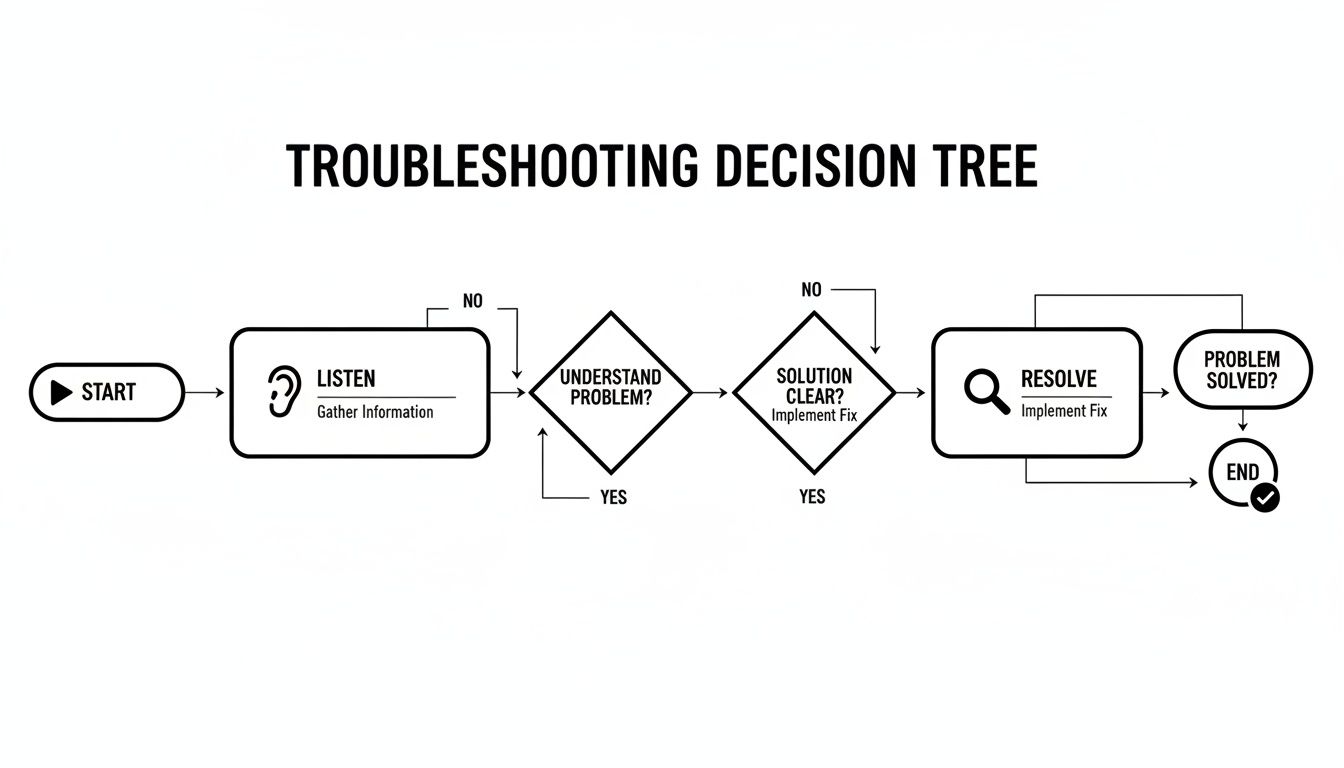
By following this methodical process, we make sure we're addressing the root cause of any issue, not just patching up the symptoms. It’s how we keep your network robust, reliable, and ready for anything.
Frequently Asked Questions
Your top questions about monitoring Tait DMR networks, answered by our New Zealand-based experts. We’ve pulled together the most common queries we get from operations managers and technical staff across the country to give you clear, practical answers.
How Often Should I Check My Tait DMR Network’s Health?
There’s no single answer here—it’s all about a layered approach. Your automated systems should be your first line of defence, keeping an eye on the network 24/7 and firing off alerts for critical failures, like a site dropping offline. From there, a trained operator should be giving the system dashboard a quick daily once-over for any new warnings or odd behaviour.
Beyond the daily checks, we find a more detailed weekly review of key metrics like call success rates and channel usage is a great habit. Monthly reports are then essential for spotting those slow-burning trends that might otherwise go unnoticed. And at least once a year, you need to get hands-on with a full physical inspection and system audit to make sure the hardware and antennas are still in good nick.
What Are The First Signs My DMR Network Might Have A Problem?
Often, your own people are the first to notice something’s up. It's absolutely vital to listen when they start reporting things like 'scratchy' or broken audio, more dropped calls than usual, or areas that have suddenly turned into communication 'dead spots.'
On the technical side, your monitoring dashboard might start showing a rising Bit Error Rate (BER), a call success rate that’s dipping below its usual level, or specific alarms like 'High Temperature' or 'VSWR Fault' coming from a remote repeater site. The whole point of proactive monitoring is to catch these technical signs before they start causing real headaches for your team on the ground.
Can I Monitor A Tait Network Myself Or Do I Need A Specialist Service?
Plenty of organisations in New Zealand with dedicated IT or comms techs can definitely handle the basic, day-to-day monitoring themselves. Using Tait's own software alongside other standard network monitoring tools is often more than enough to keep things ticking over smoothly.
However, when it comes to deep diagnostics, complex trend analysis, or troubleshooting those really tricky, intermittent faults, that's where partnering with a specialist like Mobile Systems pays off. We have the specialised test gear and years of field experience needed to make sense of complex data and fix problems that aren't immediately obvious, saving you a whole lot of time and costly downtime. We are not a large chain store with limited product knowledge; we are dedicated communication experts.
How Does Monitoring Help With My Health and Safety Compliance?
This is a massive one. For so many Kiwi businesses in high-risk sectors—think forestry, civil construction, and transport—a reliable communication system isn't just a tool; it's a core part of your documented health and safety plan.
Proactively monitoring your Tait DMR network and keeping meticulous maintenance logs demonstrates due diligence. It proves you are taking active steps to ensure your communication system—a key safety tool for lone workers and emergency response—is functioning correctly and reliably.
If a workplace incident ever occurs, having clear, documented records showing the communication network was healthy and fully operational is vital for any investigation. It validates that you provided a safe, effective tool for your team when they needed it most.
At Mobile Systems Limited, we provide the expert support and on-site service you need to keep your Tait DMR network performing flawlessly. We can help you choose the right devices, plan your coverage, and implement a health monitoring strategy that protects your team and your operations.
Talk to a communications specialist today to plan your network health strategy.
Related posts

- December 17, 2025
In New Zealand's demanding industries, from forestry and construction to transport and public safety, clear and reliable communication isn't just...

- December 14, 2025
Discover how Tait enhancing oil and gas operations with advanced radio and digitaldigital communication solutions improves safety and efficiency across...